Dictate an addition after the consultation
Written By Ignace Maes
Last updated 3 months ago
Do you have any additional information that needs to be included in the report after the patient has left? With the 'Supplement' function, you can easily add details to an already generated report.
1. Why use a supplement?
Some matters are not explicitly or fully communicated to the patient. Some examples are:
Absent clubbing
S1, S2 ok. No murmur.
Anxious impression
Detailed findings of the technical examination
Instead of typing these manually after the consultation, you can dictate them on top of (and if you want during the loading of) the consultation report.
2. How to start dictating a supplement?
Open the consultation in Squire where you want to add a supplement
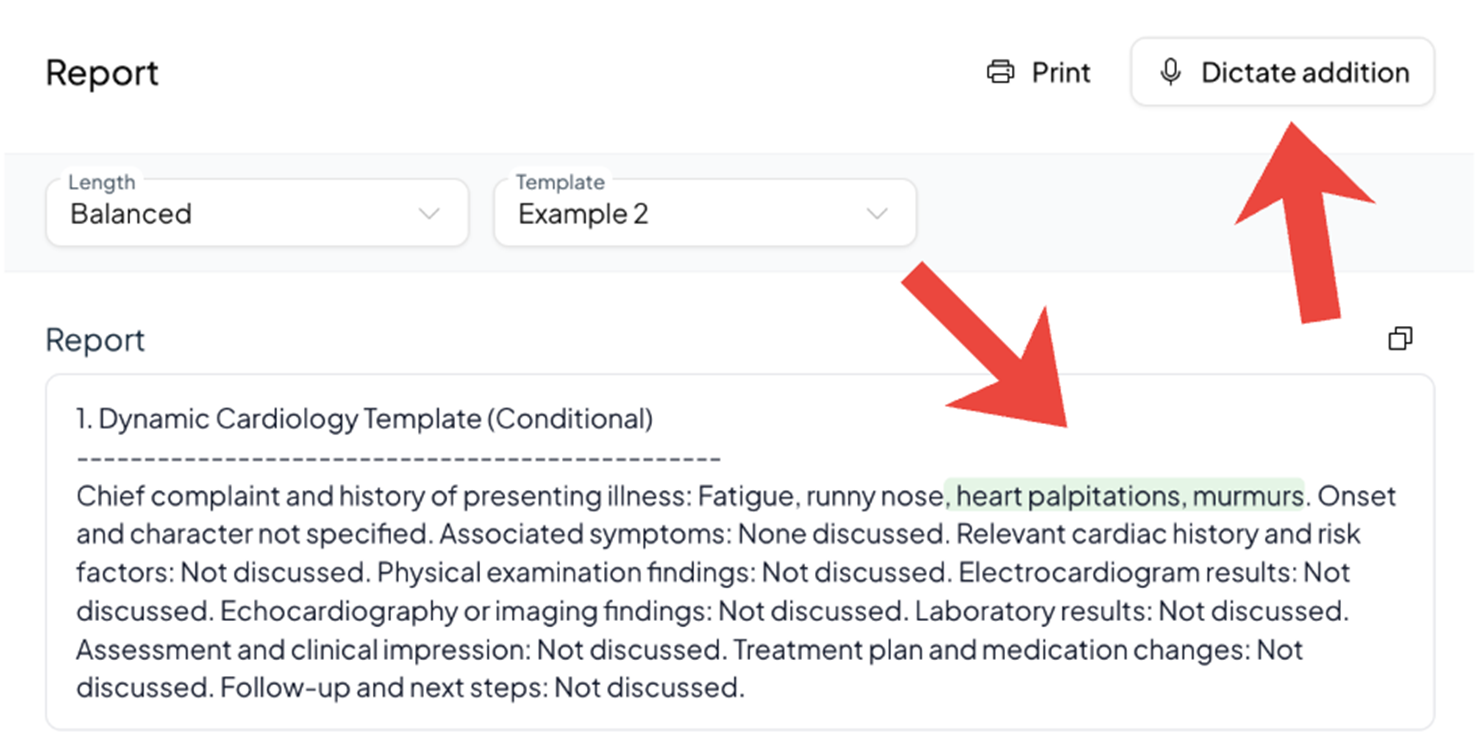
Click the Dictate supplement button (you will find it in the upper right corner of your screen).
Now calmly dictate the additional information for the report.
Example: "Patient needs to come back in two weeks for a blood pressure check."
3. Result
Once you click the stop button, the AI processes the new information:
Smart placement: The AI understands where the information belongs and places it under the correct heading in your report.
Visual check: Your dictated extra information appears in your report. To keep it clear, you will see the new changes marked in green.